Unlocking Free LLM APIs: Two Effortless Methods for Developers
The rise of large language models (LLMs) has transformed the way we build, automate, and innovate. From generating code to streamlining workflows, LLMs offer unmatched potential. However, many developers are held back by paywalls and credit card requirements just to try out these tools.
Thankfully, there are two reliable, free ways to access powerful LLM APIs perfect for personal projects, prototypes, or learning. Here’s how you can start right now without spending a cent.
Method 1: Use OpenRouter for Free LLM API Keys
OpenRouter is a platform that connects developers with a wide variety of AI models, including those from Meta, Google, DeepSeek, Tencent, and others. While some models require payment, many are completely free to use via API.
How to Get Started:
- Create an Account
Head to openrouter.ai and sign up. - Browse Available Models
OpenRouter hosts over 450 models. Around 55 are free to use. Explore the “Models” section. - Filter by Price
Set the pricing filter to “Free” to see all zero-cost models. - Choose a Model
Popular free options include:
- DeepSeek R1
- Meta LLaMA 4
- Quen 3
- Google Gemma (3B & 4B)
- Mistral
- Gemini 2.5 Pro Experimental
5. Generate Your API Key
- Go to Profile → Keys
- Click “Create API Key”
- Give it a name, confirm, and copy your key
6. Start Coding
Use their sample code (Python, TypeScript, etc.) to integrate the API and start experimenting.
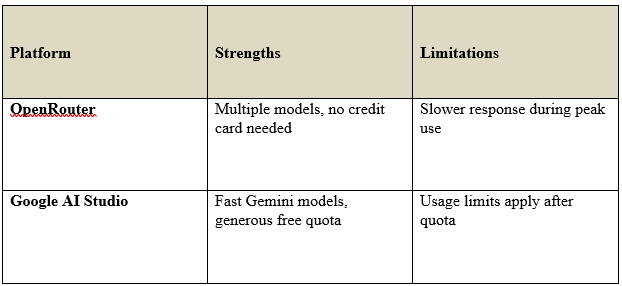
Tip: Free models may respond a bit slower due to high demand, but there are usually no usage caps.
Method 2: Use Google AI Studio’s Free Tier
Google AI Studio gives you direct access to the Gemini family of models, including Gemini 2.5 Pro, Flash, and Flashlight. The free tier is fast, reliable, and generous — ideal for experimentation or early-stage development.
🔧 How to Get Started:
- Log Into Google AI Studio
Visit Google AI Studio and sign in with your Google account. - Generate an API Key
- Click “Get API Key” in the top right
- Select or create a Google Cloud project
- Click “Create API Key” and copy it
3. Integrate the API
Use the quick-start guides or SDKs provided by Google to connect Gemini to your app or workflow.
Note: Google’s free tier offers fast responses and high reliability, but once your quota runs out, usage becomes paid.
Quick Comparison
Final Thoughts
Whether you’re a student, a hobbyist, or a developer looking to build the next big thing, these two platforms give you free and frictionless access to LLMs:
- Use OpenRouter for variety and flexibility with no usage limits
- Use Google AI Studio for high-speed Gemini models with generous free tiers
No paywalls. No credit cards. Just code and create.
What will you build first?
Feel free to share your experience or project ideas in the comments.
Useful overview. I would add a third practical route for developers who need to move beyond free-tier experiments: an OpenAI-compatible multi-model gateway. Disclosure: I work with APIMart. The useful part of this approach is keeping the existing OpenAI SDK code and changing only the base URL and key while testing GPT, Claude, Gemini, and open models through one endpoint. A good evaluation checklist is model-ID accuracy, streaming and tool-calling compatibility, rate limits, pricing transparency, and whether failed requests are billed. That helps readers avoid choosing an API only because the first request is free.